AG2
AG2 is a framework for building multi-agent applications with LLMs. This example uses AG2 to orchestrate the GPT Researcher multi-agent workflow.
Check out our blog posts:
Use case
By using AG2, the research process can be significantly improved in depth and quality by leveraging multiple agents with specialized skills. Inspired by the recent STORM paper, this example showcases how a team of AI agents can work together to conduct research on a given topic, from planning to publication.
An average run generates a 5-6 page research report in multiple formats such as PDF, Docx and Markdown.
Please note: This example uses the OpenAI API only for optimized performance.
The Multi Agent Team
The research team is made up of 8 agents:
- Human - The human in the loop that oversees the process and provides feedback to the agents.
- Chief Editor - Oversees the research process and manages the team.
- Researcher (gpt-researcher) - A specialized autonomous agent that conducts in depth research on a given topic.
- Editor - Responsible for planning the research outline and structure.
- Reviewer - Validates the correctness of the research results given a set of criteria.
- Revisor - Revises the research results based on the feedback from the reviewer.
- Writer - Responsible for compiling and writing the final report.
- Publisher - Responsible for publishing the final report in various formats.
How it works
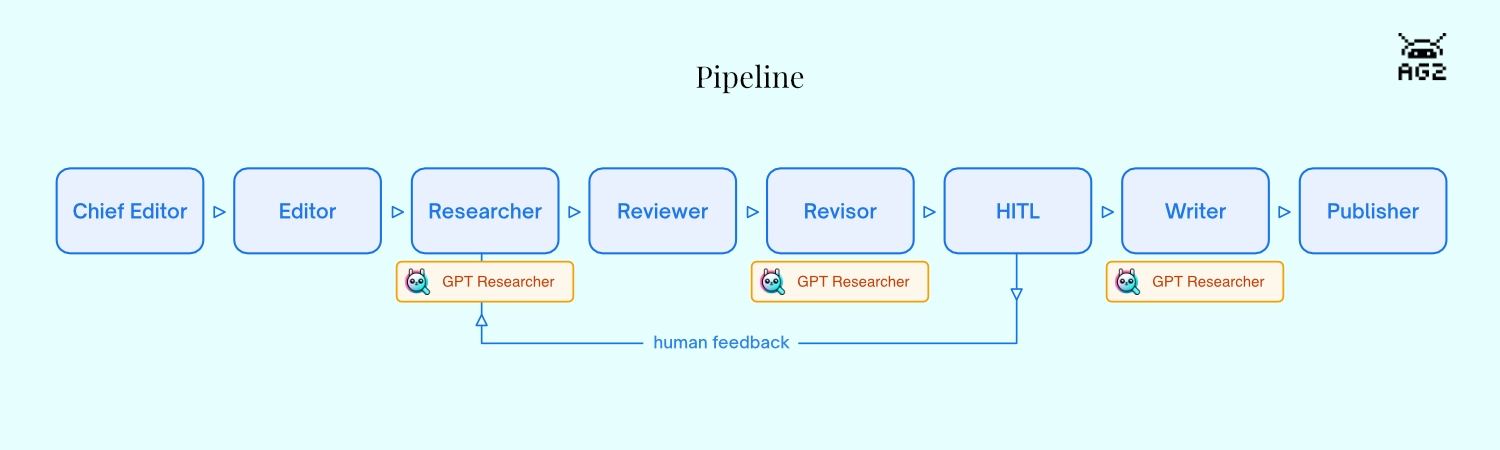
Stages:
- Planning stage
- Data collection and analysis
- Review and revision
- Writing and submission
- Publication
How to run
- Install required packages:
pip install -r requirements.txtpip install -r multi_agents/ag2/requirements.txt
- Update env variables:
export OPENAI_API_KEY={Your OpenAI API Key here}export TAVILY_API_KEY={Your Tavily API Key here}
- Run the application:
python -m multi_agents.ag2.main
Usage
To change the research query and customize the report, edit multi_agents/ag2/task.json.
Task.json contains the following fields:
query- The research query or task.model- The OpenAI LLM to use for the agents.max_sections- The maximum number of sections in the report. Each section is a subtopic of the research query.max_revisions- Maximum reviewer/reviser loops per section.include_human_feedback- If true, the user can provide feedback to the agents. If false, the agents will work autonomously.publish_formats- The formats to publish the report in. The reports will be written in theoutputsdirectory.source- The location from which to conduct the research. Options:weborlocal. For local, please addDOC_PATHenv var.follow_guidelines- If true, the research report will follow the guidelines below. It will take longer to complete. If false, the report will be generated faster but may not follow the guidelines.guidelines- A list of guidelines that the report must follow.verbose- If true, the application will print detailed logs to the console.